MINIMUM REQUIREMENTS
At a minimum everyone should incorporate the following considerations into the design of your project.
- Light & Air. Especially to habitable rooms per the code requirements we worked on in class, but also to other spaces.
- The path of the sun and the different direction and quality of light over the course of day from different cardinal directions.
- The height of the sun in the sky at different times of the year.
As a design tool, you should know the angle of the sun at noon at its highest (June 21) and lowest (Dec 21). For all progress sections cut North to South (short direction for Uptown, long direction for Hyde Park) you should show the angle of the sun at both times and the relevant shadow lines cast onto your site/building by adjacent buildings or your own building. For Final Review this will be incorporated into the required Sustainability Section drawing (so may not be needed on your regular drawings).
If you’re looking for more information about shading and dealing with East and West sunlight there is a general overview and links to all kinds of other passive solar and sustainability resources here:
http://www.2030palette.org/eastwest-shading/
There are many online calculators that will show you the current path of the sun for any chosen location. I often use:

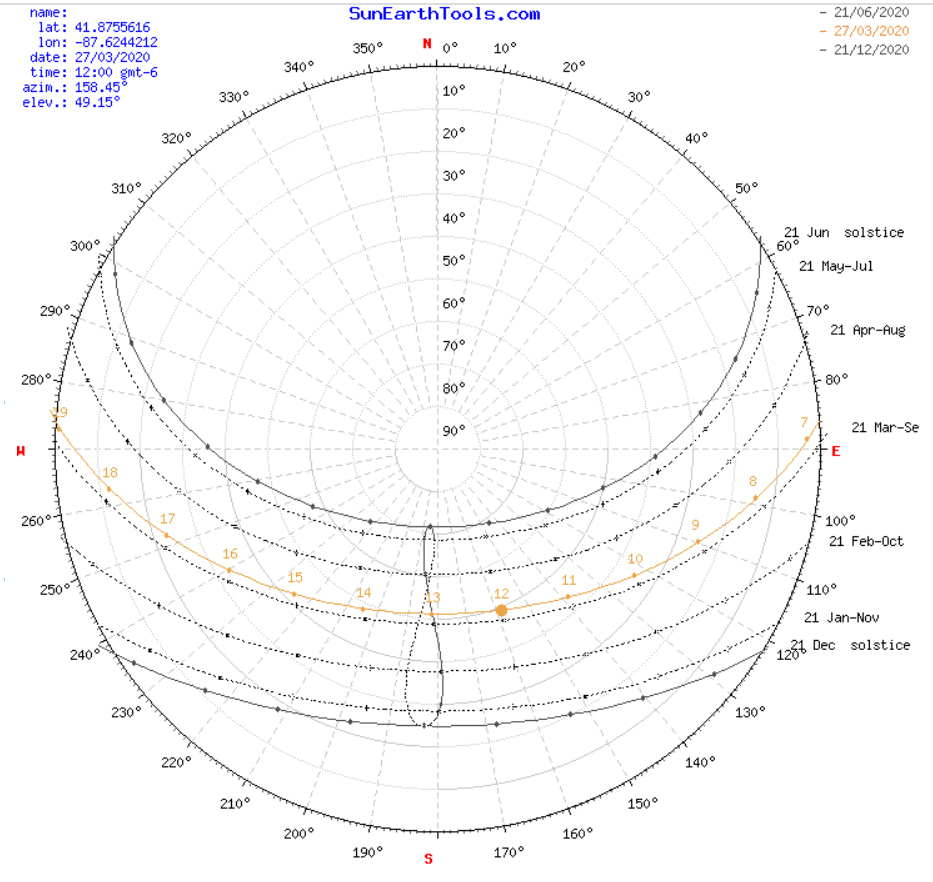
I like this site because it generates a custom sun-path diagram for the location you chose (see the slideshow above). You can also use a generic sun-path diagram that most closely matches the latitude of your site. NOTE: not all sun-path diagrams are the same: they are specific to latitudes.
To get started figure out Chicago’s latitude, and find the altitude angle of the sun on the solstices and put them in your sections. If you don’t know how to read a sun-path diagram ask for help. A couple online resources for reading sun path diagrams.
SHADING STUDIES in Rhino
Technically what we’re most interested in is knowing where (and when) sun will hit parts of your site so what we’re doing is more properly called a shadow or shading study. As many of you have already experimented with in Rhino, you can set the location, date and time to generate an accurate sun location and thus shadows cast. Note that if you didn’t model your building in the right cardinal orientation you’ll have to adjust the sun settings so Rhino will know where North is.
Rhino instructions for the sun panel.
http://docs.mcneel.com/rhino/5/help/en-us/commands/sun.htm
A youtube video of someone setting up for their sun study. Fine for general instruction but don’e follow their specifics as their model and site are different than your so won’t work for you.
http://wiki.bk.tudelft.nl/toi-pedia/Rhino_shadow_analysis
By moving around the time of day and year you can accurately see where the sun will be hitting and adjust your building massing or fenestration accordingly. I’d also like you to export some of the key feedback you got from your design work. If you can set a good camera angle you can make an animation and/or take multiple stills from the same vantage point to show sun and shade. Often, as few three points in time are sufficient to convey what’s happening:
- The first point of significant sun hitting the relevant portion of your building.
- Noon
- The last point of significant sun hitting your building.
You can experiment with the number of times to use, composite the shadows together in photoshop, put the images in series. make an animation…
Advanced Rhino Plug-ins
Optional, but highly recommended even if you are not working with a program that depends on the sun are plug-ins that give you added visualization tools for shadow studies (and access to all kinds of other advanced tools and visualizations). I haven’t used this one before but based on recommendations and the price ($0) am suggesting the plug-in DIVA.
https://www.solemma.com/Diva.html
You will need to download the free trial version (at 30 days you don’t need it for longer) but after you have installed it you can then request a free annual student license. I downloaded and tested for both Rhino 5 and 6. There’s also a very clear and thorough youtube video explaining how to use the plug-in for a shadow study. It uses a few basic steps in grasshopper to set the inputs but explains them so clearly that even I could do it.
If you’ve got a different plug-in or program you want to work with go right ahead- all that matters is that you can test your assumptions about the sun.
 Hathaway Section - Spring 2020